Internal Tool Case Study
TrackQA – Internal QA & Debugging Workflow Tool
Last Updated: March 2026
TrackQA is an internal workflow tool I built to organize debugging tasks, QA verification, refactoring work, and technical debt. While building and improving software, I needed a more structured way to track issues across multiple stages without relying on scattered notes or heavyweight project management tools. TrackQA was designed to make internal work more visible, more traceable, and easier to move from investigation to verification.
Overview
TrackQA was built as a practical internal tool for managing debugging and QA work in a more structured way.
The goal of TrackQA was not to recreate a full project-management system. It was to create a lightweight internal workflow that made it easier to create tickets, track ownership, move work through defined stages, and preserve the history of changes made during QA and debugging. The result is a focused tool built around clarity, traceability, and practical day-to-day use.
The Problem
The project started with a simple issue: QA work was happening, but the workflow around it was inconsistent.
- QA issues and debugging tasks were often tracked outside of a dedicated system
- There was no clear structure for moving work from investigation to testing to verification
- Ownership and status visibility could become inconsistent
- Important bugs, refactors, or technical debt items could be forgotten
- The workflow needed to stay lightweight instead of feeling like a full project management platform
The Solution
TrackQA brings structure, ownership, and visibility to internal QA and debugging work without unnecessary overhead.
- Built a centralized internal ticket system focused on QA and debugging workflows
- Created a defined status flow from Open to Closed
- Added locked fields after ticket creation to protect ticket history
- Used owner dropdowns instead of free text to improve consistency
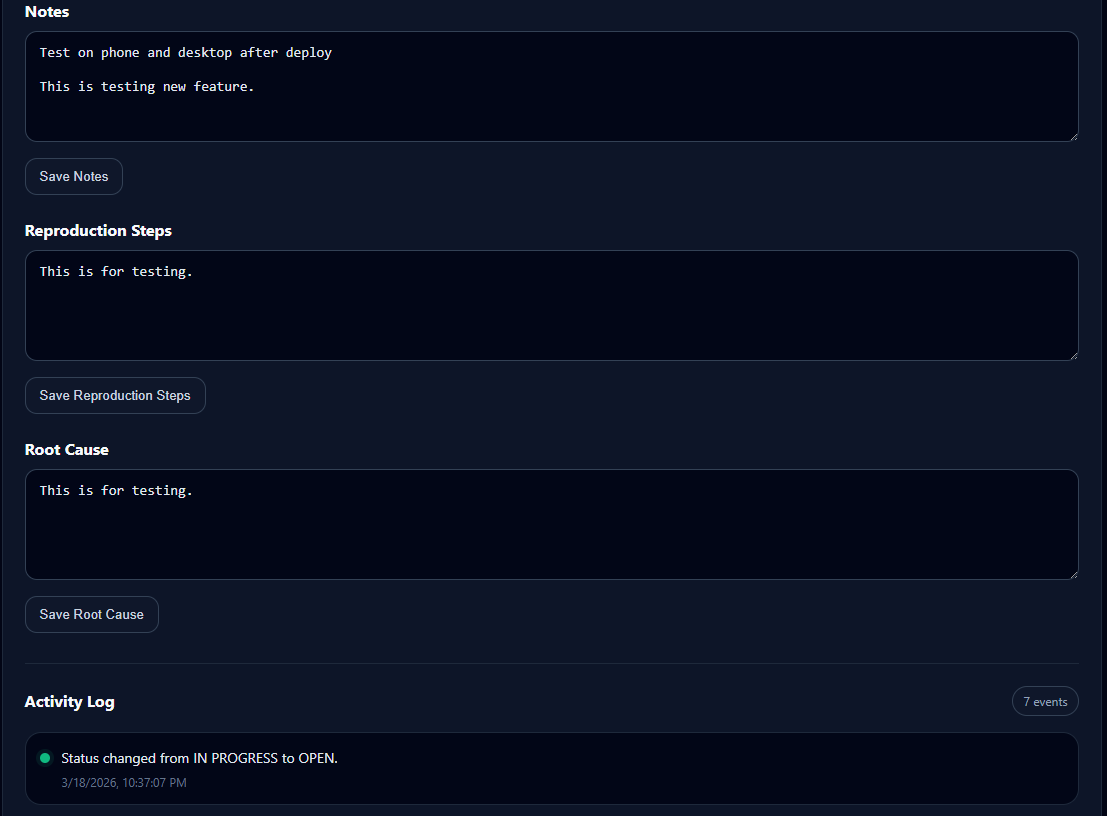
- Added resolution summaries, QA verification notes, and activity history
Workflow Design
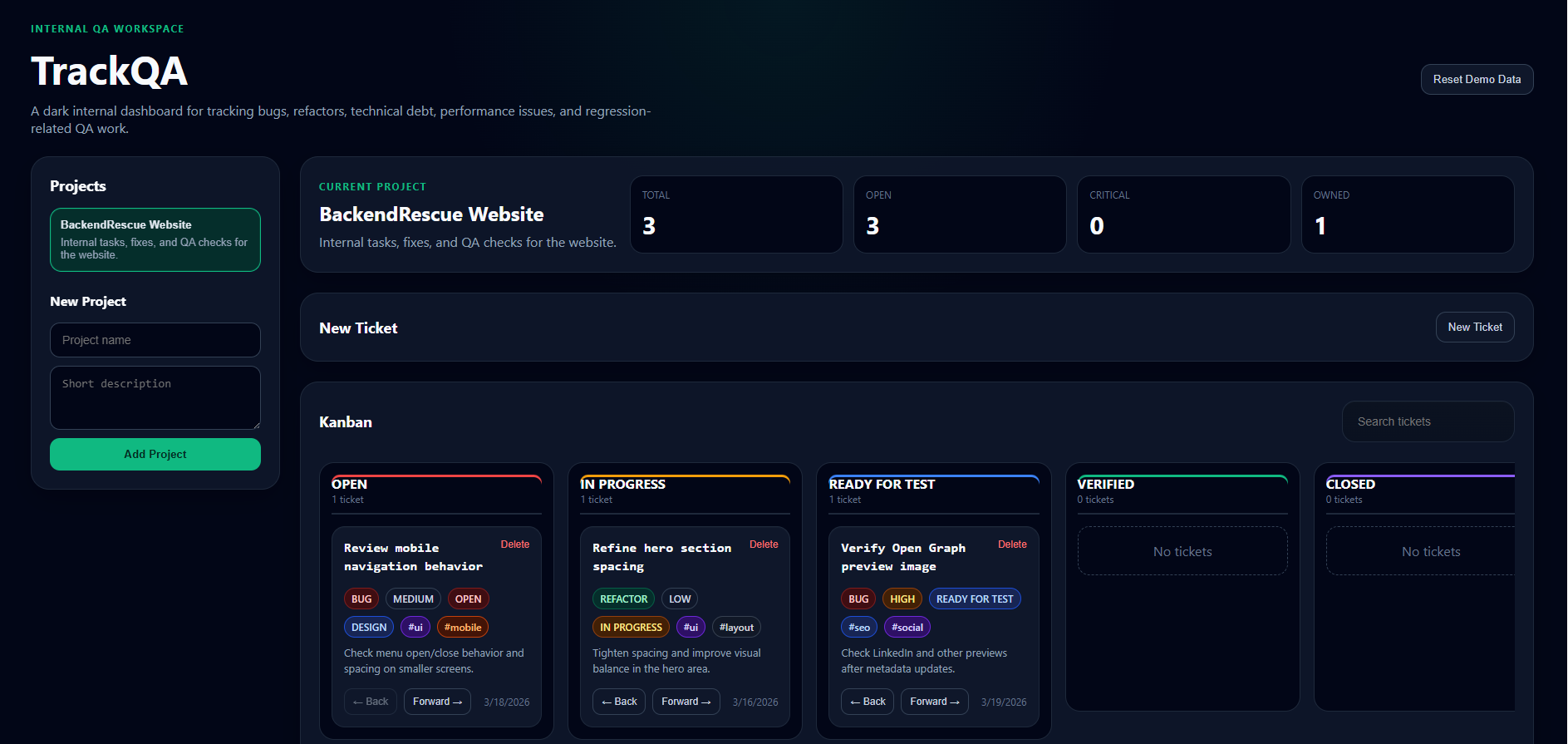
TrackQA uses a 6-step workflow designed to move work from issue creation through investigation, testing, verification, and final resolution.
Create a ticket for a bug, refactor, QA task, or technical debt item
Move the ticket into In Progress while investigating or implementing a fix
Advance the ticket to Testing once the change is ready for review
Add QA verification details when testing is active
Move the ticket to Verified after QA passes
Close the ticket with a final resolution summary
System Architecture
A lightweight frontend-first architecture focused on speed, clarity, and future flexibility.
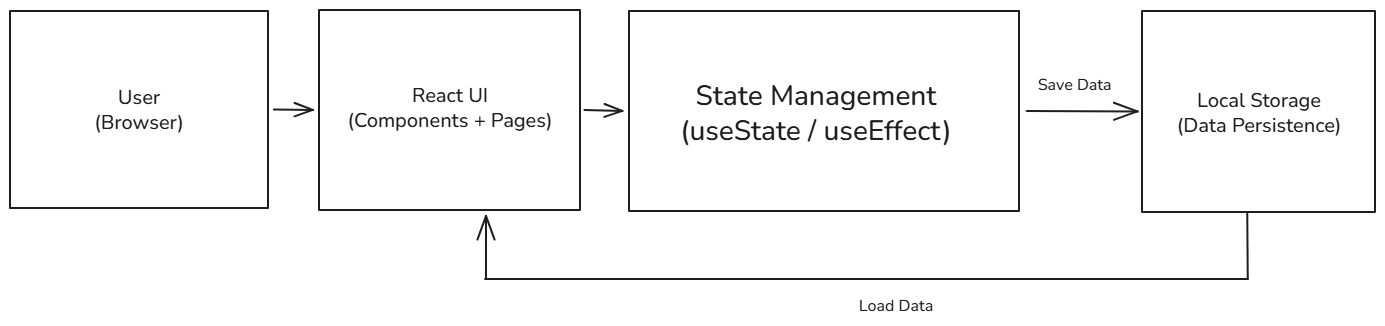
- React powers the frontend interface and component-based UI
- React Router handles dashboard, ticket, and case study navigation
- Local Storage persists ticket and project data between sessions
- A modular structure supports future backend migration and multi-user expansion
Before vs After Workflow
TrackQA replaced informal tracking with a more structured and traceable internal process.
Before
- Issues were handled informally through notes, memory, or scattered messages
- There was no consistent workflow between issue creation, testing, and verification
- Ownership could become unclear as work moved between stages
- Historical changes and investigation progress were easy to lose
After
- Tickets move through a structured workflow from Open to Closed
- Ownership is visible at a glance through consistent labels
- QA verification appears only when relevant to the ticket status
- Timeline history improves traceability, visibility, and accountability
Core Features
TrackQA focuses on the features needed to support a clean and reliable internal QA workflow.
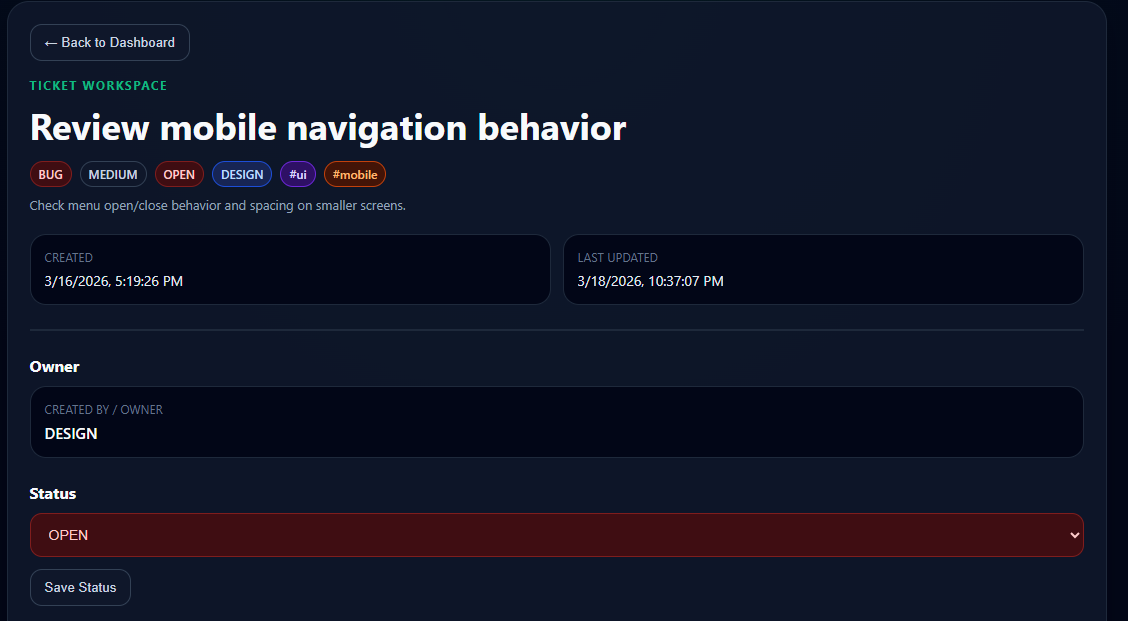
- Ticket creation and detail pages
- Structured status workflow
- Activity log for ticket history
- Ownership tracking
- Color-coded tags
- Resolution summary
- QA verification notes
- Conditional UI sections based on ticket state
- Local storage persistence
- Multi-page routing between dashboard and ticket views
User Interface
A dark, operational dashboard designed for quick scanning, ticket detail access, and traceable QA activity.
Technical Challenges
The most valuable part of this project was solving practical UI, workflow, and persistence problems during development.
- Fixing blank ticket-page rendering caused by routing and state issues
- Making local storage persistence sync reliably across views
- Conditionally rendering sections like QA Verification only when relevant
- Locking key fields after creation to prevent accidental history loss
- Tracking meaningful ticket changes inside the activity log
- Keeping status-based UI behavior clear and consistent across the app
- Designing tag colors and owner labels so tickets could be scanned quickly
What I Learned
Building TrackQA strengthened both my technical thinking and my approach to designing tools around real workflows.
- How to structure a React application around a workflow instead of isolated screens
- How to manage state and persistence across multiple views
- How to debug routing, rendering, and UI state issues in a practical project
- How internal tools benefit from clarity and speed more than feature overload
- How product decisions and technical decisions influence each other
Impact
Even as an internal tool, TrackQA demonstrates product thinking, workflow design, and practical frontend architecture.
Future Improvements
TrackQA began as an internal tool, but the architecture and workflow open the door to broader product expansion later.
- Move from local storage to a database-backed architecture
- Add authentication and user accounts
- Support multi-user projects and shared workspaces
- Create a backend API for ticket and activity data
- Add comments, attachments, and notifications
- Expand reporting and dashboard views for QA trends
- Evolve the internal tool into a future SaaS product
References
This case study connects to the working internal application and related engineering investigations.
- Related System: TrackQA Internal QA & Debugging Workflow Tool
- Repository: trackqa-internal
- Related Case Studies: Debugging, state management, workflow design, and backend migration